Every week we build a fictional business a complete website in about an hour, using nothing but the chat in DirectAdmin. This week: Kapsalon Knip & Zo in Groningen, two hairdressers, cuts, colour and beard care. The model: OpenAI Codex on GPT-6-Astra. The site is live at kapsalon.nieuwesite.nl and stays online.
The rules are simple. An empty domain, four commands typed in verbatim, the assistant in auto mode, and nobody fixing things in between. The timings below come from the assistant's run log.
The numbers
| Task | Command | Time | Approvals | Result |
|---|---|---|---|---|
| 1 | Install WordPress | 196 s (chat hung for 25 min) | 0 | WordPress live with its own database |
| 2 | Build a custom theme | 485 s | 0 | Theme knip-en-zo, 4 pages, checked on mobile |
| 3 | Booking plugin | 614 s | 0 | Plugin with admin page and confirmation email |
| 4 | Set up LiteSpeed Cache and measure | 226 s | 0 | Cache on, load time measured before and after |
| 5 | Fill in the details (extra) | 210 s + 106 s | 0 | Online booking switched on |
Model: OpenAI Codex, GPT-6-Astra, auto mode. Total run: 47 minutes, of which 25 minutes waiting on a stuck chat (task 1). Net build time for four tasks: about 25 minutes.
The commands
1. "Install WordPress with the title Kapsalon Knip & Zo." Codex checked the folder first, saw it was empty, and installed WordPress with its own database. According to Codex's own session log that took 3 minutes and 16 seconds. In the chat, however, it then sat on "Running a command" for 25 minutes. More on that below, because it was not Codex's fault.
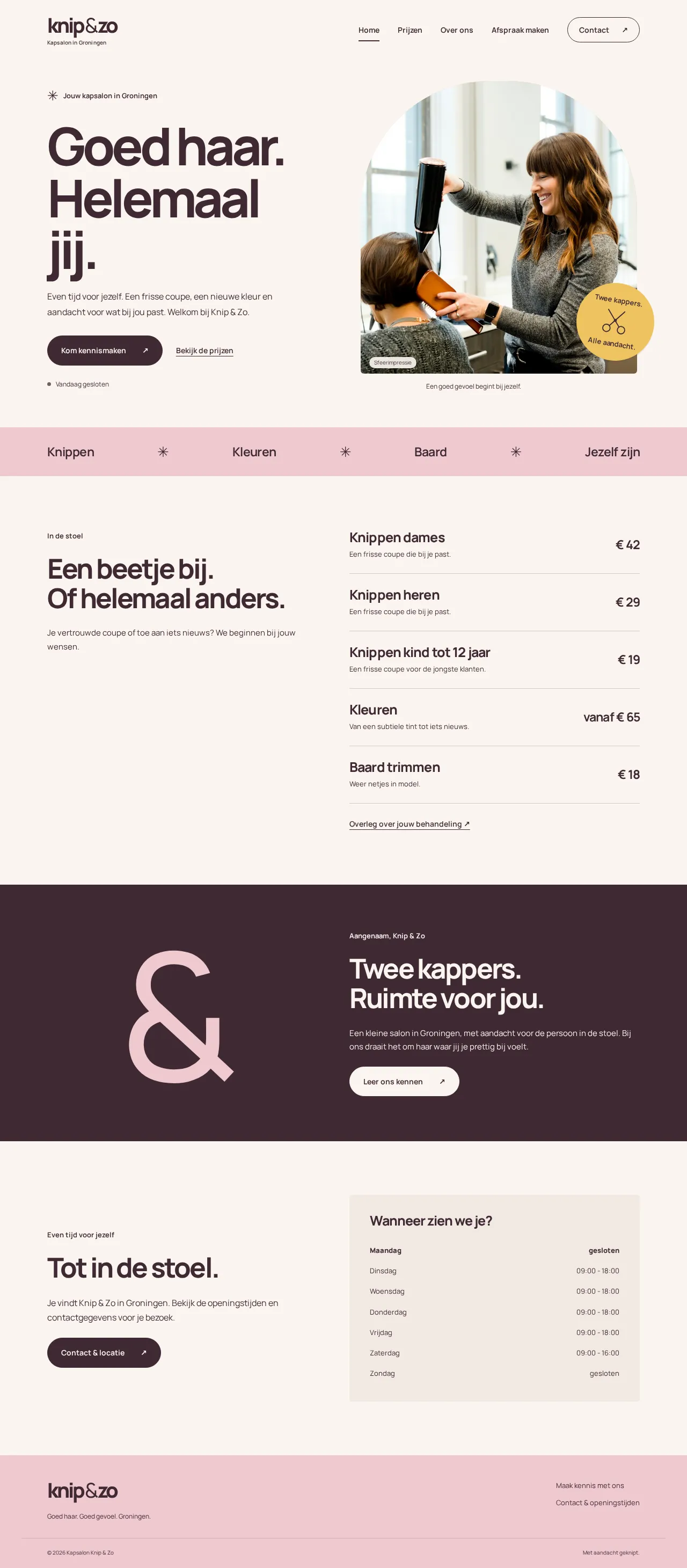
2. "Create a custom theme for Kapsalon Knip & Zo: a warm, modern hair salon in Groningen with two hairdressers. Homepage with today's opening hours, a price list, an About page with the two hairdressers, and a contact page with a map. No stock template." 485 seconds. A theme called knip-en-zo, deep aubergine on warm cream, its own font, a big headline "Goed haar. Helemaal jij.", price list, About, Contact with map, and a badge "Twee kappers. Alle aandacht." Codex checked its own result on desktop and mobile with screenshots.

What stood out: the assistant asked for the hairdressers' names, the address, phone number, opening hours and prices. We had not provided any of that. Instead of making them up, Codex put "coming soon" everywhere and kept building.
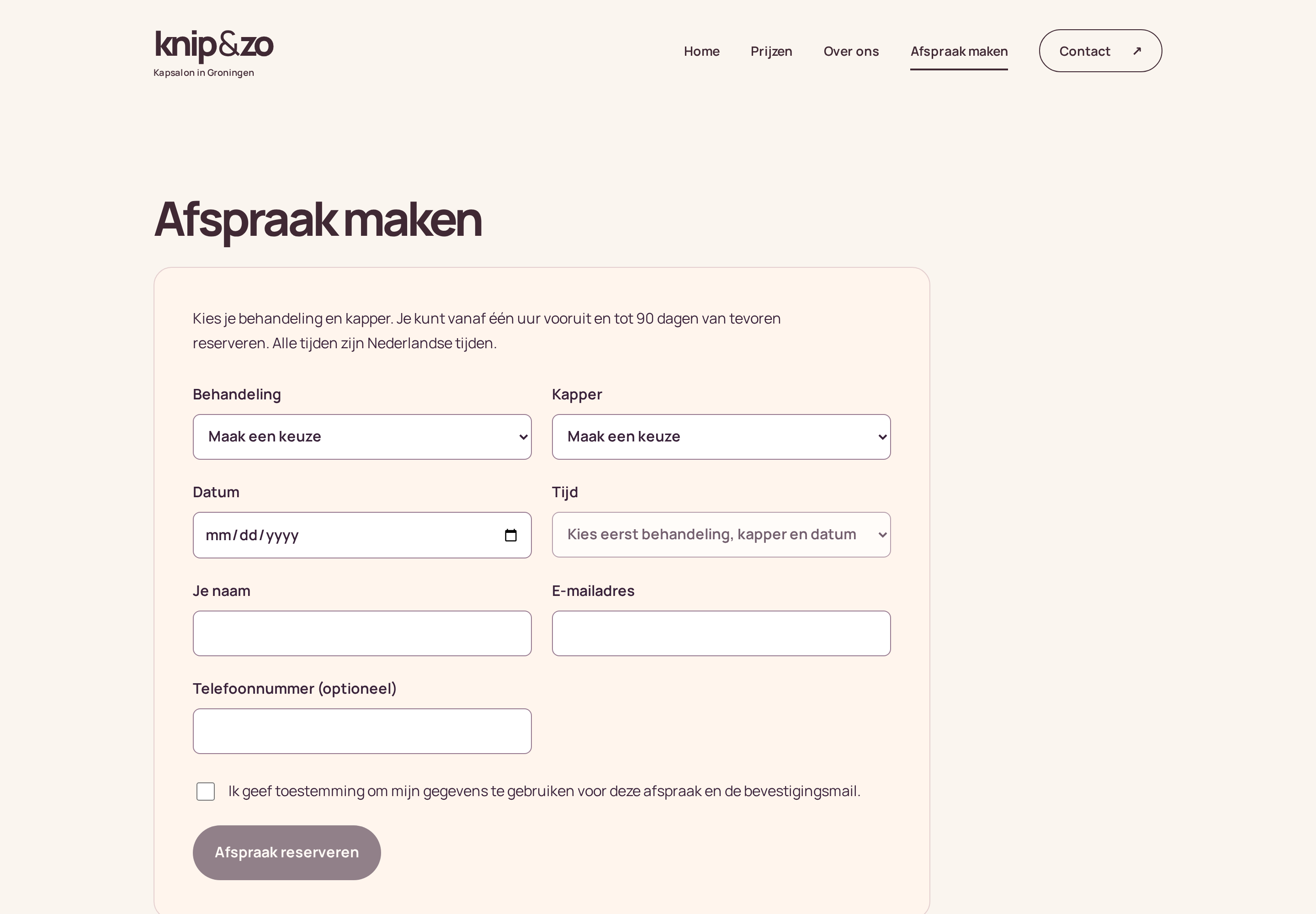
3. "Create a plugin that lets customers book an appointment online: choice of treatment, hairdresser, date and time, with an admin page for the salon and a confirmation email." 614 seconds. Plugin knip-zo-afspraken: treatment, hairdresser, date and time, management under WordPress → Afspraken, confirmation emails, protection against double bookings, and its own test that checked the page on mobile and desktop.
Same pattern here: because the real treatments and hairdressers were missing, Codex deliberately switched online booking off and the page said "Online booking coming soon". Tidy, but a weak picture for a booking plugin demo. So we supplied the data after all.
5. The data. Two hairdressers, address, phone, opening hours and prices in one message: 210 seconds, everything filled in, then a follow-up question: how long does each treatment take? With those durations: 106 seconds, online booking on, and Codex checked itself that every combination of treatment, hairdresser, date and time works.
4. "Configure LiteSpeed Cache properly for this site and measure the difference in load time before and after." 226 seconds. Browser cache on, files minified, and the booking page and opening hours deliberately kept out of the cache. Then seven measurements before and after, median: desktop from 333 to 324 milliseconds, mobile from 305 to 303. Codex's own conclusion: the site was already fast and this difference is within measurement noise. A more honest answer than a pretty percentage.
The whole site, page by page
All four pages from the menu as they are live now, as full-page screenshots. Scroll inside the window to see a whole page. The mobile button shows the same page as it looks on a phone.
What broke
One thing, and it was ours. After the WordPress install, Codex sends a list of all 398 files it wrote to the chat. Our integration turns that into one change card per file, full contents included. That stream stalled, most likely there. Codex was already finished and WordPress was up, but the chat stayed on "Running a command" until our 25-minute limit ran out. The theme (17 files) and the plugin went through fine.
The fix is on the list: summarise large changes instead of showing every file, and a watchdog in the integration that steps in when Codex reports done but the chat never hears it. Without that hiccup the whole project would have taken just over 25 minutes: 196, 485, 614 and 226 seconds.
What we learned
- Provide the facts, or let it assume. Codex does not invent hairdresser names, addresses or prices, and asked for them twice. Tidy, but in auto mode you want it to keep building. Since this episode the assistant's standing rules say: when data is missing, pick a recognisable example value, build the feature working, and ask for the real data afterwards. It only asks before irreversible steps.
- Astra is thorough, not fast. Eight minutes for a theme and ten for a plugin, including its own tests and screenshots. Claude did last week's bakery in comparable times. The difference is in working style, not speed.
- The integration is the weakest link, not the model. The only real failure today was in our own software.
Claude or Codex?
This episode ran entirely on Codex. The theme is more tasteful than we expected, and the plugin came with its own test. Next week we do a rebuild: a physiotherapy practice with a site from 2012, on Claude Opus. Then we will see whether the two have anything to teach each other.
Want to try this yourself? You link Codex or Claude in Invoker Link with your own subscription; the plans are at web hosting.